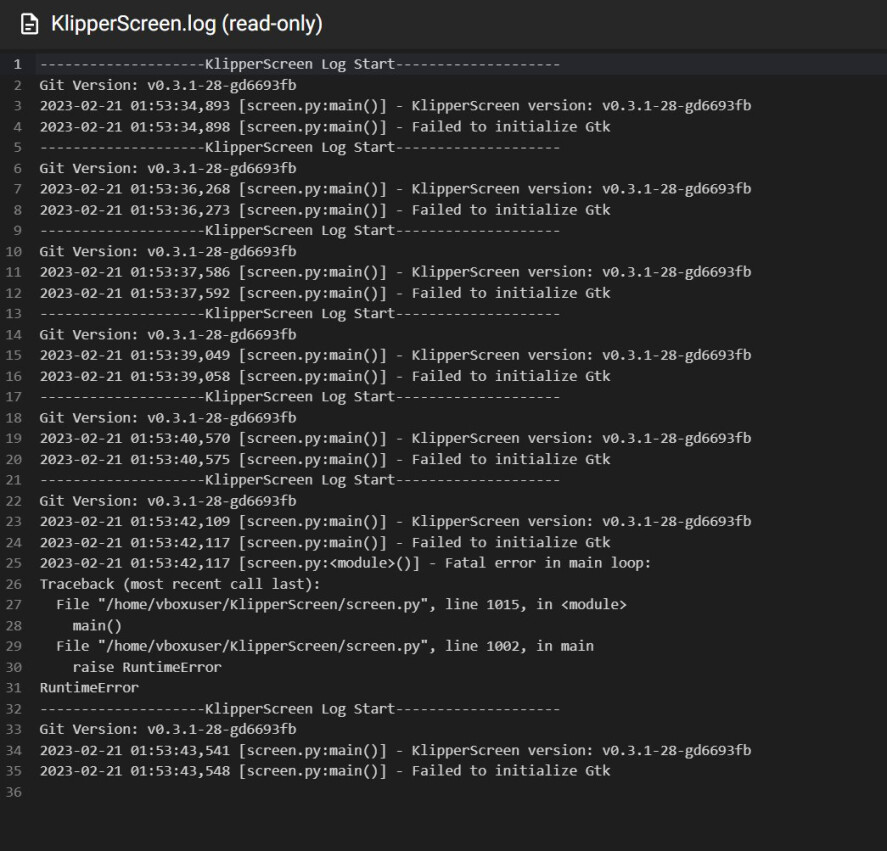
Only when Klipperscreen is not connected to any device, the log file keeps registering the same errors:
Failed to initialize Gtk and Fatal error in main loop: RuntimeError.
Is this normal?
Im new to klipper and not very good with Linux. Is there a more up-to-date step by step on how to get klipper screen running on a tablet via Wi-Fi?
What version of XSDL are you using?
Hi ,
I am using version 1.20.51
I got KlipperScreen to run once over USB, it started having issues not responding to touch after a few button presses. Now it won’t launch at all. I’ve tried restarting everything.
I’m getting this output:
Can't find service: nfc
Can't find service: nfc
Starting: Intent { act=android.intent.action.MAIN cat=[android.intent.category.LAUNCHER] cmp=x.org.server/.MainActivity }
Warning: Activity not started, intent has been delivered to currently running top-most instance.
Waiting for x-server to be ready
Then it hangs waiting for x-server
ViewTouch will display the screen correctly but doesn’t handle touch input
very interested please and thankyou
I was following the guide here:
Installing klipperscreen by KIAUH literally replaced my GUI of my OS. I worked out how to disable it, uninstall it and startx for ubuntu again.
I’m trying to run klipperscreen on a laptop which i connect a phone to as a touchscreen/display. Am I doing something wrong?
edit: I think I was supposed to install klipperscreen on my device?
HI all!! i have made a repo for what I call DroidKlipp.
I did not know of this way of doing it from this thread till I ran across it last night.
none the less this does the same thing but automated and uses usb tethering instead.
I made my repo not knowing of this. so i modified my repo and added links to the klipperscreen doc that links me to this thread.
my method is completly automated easy for noobs.
all you need to do is turn on usb debugging and choose default usb configuration as usb tethering. what this also does is share the wifi from the phone as well and gives the linux pc internet.
basically i used this method because if i run XSDL on android after usb tethering is enabled i get an xserver port on my usb tether ip.
this makes it seamless.
i will be making another script soon that will use this adb method incase someone doesnt wanna use usb tethering method.
update to my repo soon!!!
note: if you have wifi off on the phone and ssh intoo the pi or linux pc and try to install somthing from the internet or update somthing it will not download. i keep wifi on, on the phone to avoid this issue.
i updated my script and removed the usb tethering info and used this method. now any noob can use their android as a klipper screen. have fun!