Basic Information:
Printer Model: Custom built
MCU / Printerboard: BTT Octopus Pro, 2x EBB tool boards over CAN
Host / SBC : BTT Pad7 w.CB1
Describe your issue: (sorry, long read)
The Setup: 99% working perfectly with a few strange issues.
Long time printer user/builder/klipper user, and this one has me (as well as AI) stumped.
I have built a custom IDEX printer. It is a back to back style machine where Y axis is shared, the X axis’ are on separate rails, on either side of the main carrier rail, “back to back”.
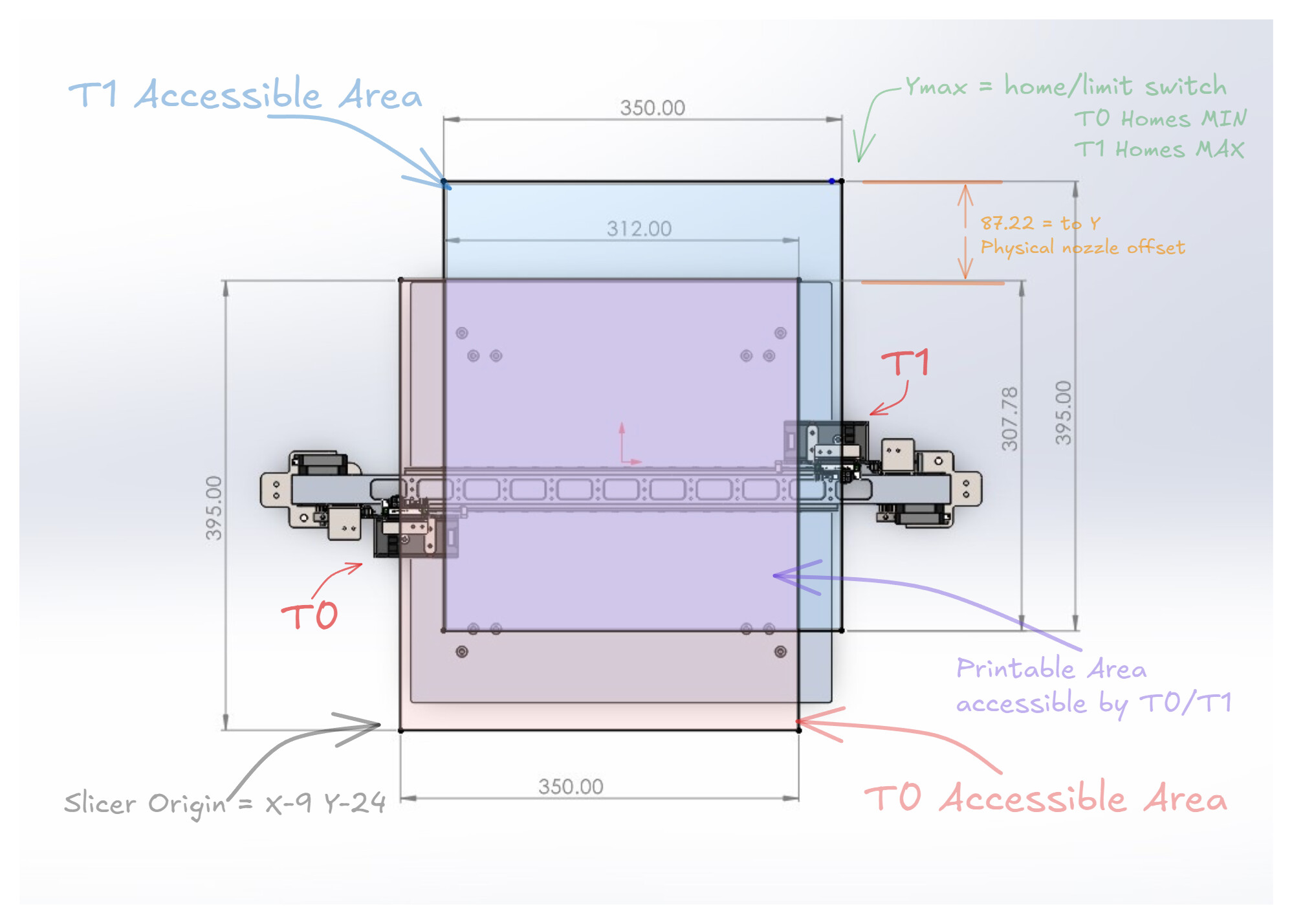
The physical offset of the nozzles is 87.22mm in Y. (note there is no X offset for a back to back such as this)
The machine travel limits are:
X (primary carriage) min:0 max:350
X2 (dual_carriage) min:41 max:395
Y min: -90 max: 395
The differing X limits are due to the B2B setup and the limits at each extreme respectively, to get full bed access.
The Y -90 min is required to allow the -87.22mm offset to access the build plate properly).
The bed is 370x370mm. Both extruders, as you can tell by the limits, travel out of bounds of the bed to allow for a wipe zone at either side of the bed.
T0 can travel out of the bed boundary in -Y, and T1 can travel out of the bed boundary in +Y
The problem: Weird offset requirements for Y axis.
In order to get proper alignment, and no out of range errors, I have to have a -174.53mm offset in Y in my Klipper config. I ALSO, have to have a Y-87.22 in my slicer offset for T1. Note, the 82.77mm offset is the actual physical extruder offset.
I have tried every possible option I can think of. Slicer Y offset for T1 set to 0, and klipper Y offset set to -87.22 seems like the obvious way it should work, but it does not.
I have tried all sorts of other ways off applying various gcode offsets upon toolchanges etc, in Klipper. Even resorting to using AI (Claude Opus, and a few others) to help sort it out. They could not come up with a working solution other than the one stated above either.
Albeit, my setup and macros as they are, work great with no issues. I dont like the weird numbers that seem to be simply working by accident, and would prefer a cleaner setup that requires no offsets in the gcode for auxiliary tools.
This is also preventing me from properly implementing auto swap to next tool on filament runout as offsets are not applied properly when a gcode tool change takes place. Even though I have tried saving these offsets, reapplying them if this occurs, and even hard coding them in. Still doesnt work for some reason. I also want to be able to swap to the next tool on the fly mid print, for say changing colors on a whim mid print. This printer is primarily for multi material (breakaway/dissolvable support etc.) rather than color swapping, but still a nice feature to have.
If you look at my configs, you may see some unfamiliar stepper configs etc. This is all correct, as I am using servos on all axis other than Z, among a few other weird things.
I have attached my full config. There are a few placeholder macros, such as the filament runout, ignore the functionality of those.
Klipper_IDEX_B2B.zip (11.0 KB)
Any help would be much appreciated. Many thanks in advance.
EDIT: I have attached a drawing showing the printers geometry. The printable area shown is only the are accessible by both tools. T0 alone can access more bed. Hence why printable area set in slicer is set at full bed. I tried setting the slicer bed size to only that accessible by both tools, with appropriate origin offset, and I get the same wonky offsets required.