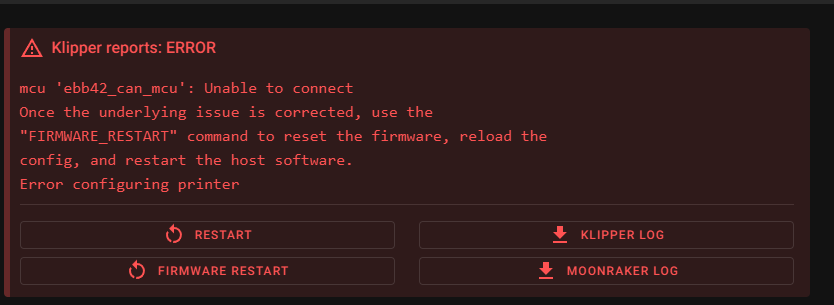
I have been following a variety of guides and troubleshooting from across Klipper docs, BTT github, Klipper forum posts and the various articles across the internet people have linked to as helpful for them. I have reached the point where I feel it is worth asking for help from the community because I’m very much starting to question my sanity and would like guidance from people who have seen this situation before, or ones similar to it.
My process so far:
Kiauh built firmware for samd21 and rp2040 mcus and have successfully connected them and operated motors/leds with them over USB (so I know I can get a basic setup working)
Kiauh (V6) built firmware for EBB42 and flashed over USB. I have not installed canboot because I want to use a USB bootloader until I have confidence in the canbus (which I clearly don’t have yet!).
U2C have not touched firmware. Came as V2.1 hardware and shipped a couple of weeks ago, so fw should be reasonably up to date. I have seen others attribute issues to updating fw on U2C, so am leaving that one alone for now.
~/klippy-env/bin/python ~/klipper/scripts/canbus_query.py can0 was able to find my EBB42 and I got the canbus ID for my printer.cfg. I did try using that command again, unsuccessfully, before reading that I shouldn’t use it in troubleshooting tips at a later time.
I am using the molex connectors and cables between the U2C with all power and CAN conductors populated/connected. The power is 12V DC from a regulated battery pack into the screw terminals on the U2C. I have tried with and without the USB cable between the pi and EBB42 (with power-from-usb jumper removed while under power from U2C molex cable), just in case there is a whacky grounding issue. My molex/CAN cable between U2C and EBB42 is 50 cm long. The -V/+V wires are twisted with each other. The CANH/CANL wires are twisted with each other.
I can see can bus signals on the CANH/CANL wires using my scope.
Pi can0 rate is 1M, as per the EBB42 firmware in kiauh.
What other things should I check and do you need to know to help?
Update. I have comms working now. I will mark solved but I’m not really content with the fix.
A tip - if you reflash the EBB42 with the USB firmware and test it works with klipper, you can rule out the board being generally problematic. When connected over USB, klipper started without reporting any issues.
I then rebuilt the CAN version firmware but dropped the clock rate to 250k from 1M. After changing the can0 files on the Pi to reduce the bus speed, klipper started without issue on CANBUS. Yet to test commands work properly.
The part I’m not happy about is having to drop signalling speed. But I can work on this once I have other things ironed out.
EDIT: I spoke too soon. I tried turning the unloaded NEMA17 motor on the EBB42 with a command MANUAL_STEPPER STEPPER=ebb42_motor ENABLE=1 SET_POSITION=100 and although the motor enabled it didn’t turn. So I tried uncommenting the TMC2209 parts of the config and restarting klipper, which then failed to connect again. The results of checking on the bus before and after.
I reflashed the can klipper fw to the EBB42 and have stripped back my ebb42.cfg (which I include in printer.cfgto:
[mcu ebb42_can_mcu]

canbus_uuid: 1d7feb983f80
Klipper now starts without complaint after a reboot. Now I need to add the motor on the EBB42 back in. When I extend the mcu to include a manual stepper motor, like this
[manual_stepper ebb42_motor]

# Stepper motor on BigTreeTech EBB42. Config taken from https://github.com/bigtreetech/EBB/blob/master/EBB%20CAN%20V1.1%20and%20V1.2%20(STM32G0B1)/sample-bigtreetech-ebb-canbus-v1.2.cfg
step_pin: ebb42_can_mcu: PD0
dir_pin: !ebb42_can_mcu: PD1
enable_pin: !ebb42_can_mcu: PD2
# microsteps, gear_ratio, etc.
rotation_distance: 60 # Estimate based on SG15 bearing and 4mm dia polyurethane round belt
microsteps: 16 # Guess based on A4988
I get klipper failing to start. If I remove it and reflash the mcu, klipper starts. Anyone know what’s going on here, why I can’t add a manual stepper to the EBB42? Is it related to needing TMC2209 uart config? I did have that section in, in the past, but commented out trying to isolate the cause of klipper failing to start.
So rather than trying to make a manual stepper work, I want to confirm if I have a different kind of issue, where the can bus just isn’t working. So based on I added the fan pin to the config, with the manual stepper config commented out:
And when I reflash with this config already saved, it appears to allow command of the mosfet on the EBB42. Only tested with a multimeter so far but I will get a 12v fan on it to double check later.
So this makes me think manual stepper might not be compatible with TMC2209 on uart control. Can anyone confirm that?
Looking at your printer.cfg definition for the stepper:
[manual_stepper ebb42_motor]

# Stepper motor on BigTreeTech EBB42. Config taken from https://github.com/bigtreetech/EBB/blob/master/EBB%20CAN%20V1.1%20and%20V1.2%20(STM32G0B1)/sample-bigtreetech-ebb-canbus-v1.2.cfg
step_pin: ebb42_can_mcu: PD0
dir_pin: !ebb42_can_mcu: PD1
enable_pin: !ebb42_can_mcu: PD2
# microsteps, gear_ratio, etc.
rotation_distance: 60 # Estimate based on SG15 bearing and 4mm dia polyurethane round belt
microsteps: 16 # Guess based on A4988
I don’t see an endstop_pin parameter which, I believe, is not optional.
When I use it, my manual_stepper statement looks like:
I have successfully used a manual stepper on the samd21 paired with A4988 driver and no endstop configured. Configuration reference - Klipper documentation seems to suggest it is optional too. But thank you for highlighting something worth checking. The BTT github config also does not contain a real or virtual endstop, so I think I will keep omitting for now.
*EDIT: I am using kinematics: none, which might explain why I don’t need an endstop. It is required for several axes on cartesian printers.
Thank you very much for confirming that this shouldn’t be a problem and can be shown to work. Any further things to check would be gratefully tested.
I suggest you add a momentary on switch to your EBB42 (or your main controller board) and reference it in the manual_stepper statement and use it to test as an endstop to see whether or not it is optional.
So this now works (ie klipper starts) if, and only if, I reflash the EBB42 mcu firmware. It does not work to save and reset klipper etc.
[mcu ebb42_can_mcu]
canbus_uuid: 1d7feb983f80

[manual_stepper ebb42_motor]
step_pin: ebb42_can_mcu: PD0
dir_pin: !ebb42_can_mcu: PD1
enable_pin: !ebb42_can_mcu: PD2
rotation_distance: 60 # Estimate based on SG15 bearing and 4mm dia polyurethane round belt
microsteps: 16 # Guess based on A4988
endstop_pin: ^ebb42_can_mcu:PB8
velocity: 5
accel: 5

[tmc2209 manual_stepper ebb42_motor]
uart_pin: ebb42_can_mcu: PA15
run_current: 0.650

[fan]
pin: ebb42_can_mcu: PA0
I can use MANUAL_STEPPER STEPPER=ebb42_motor ENABLE=1 SET_POSITION=100 to try and move the motor, although it only enables it and doesn’t move. MANUAL_STEPPER STEPPER=ebb42_motor ENABLE=0 successfully disables it, so I know the device is not locked when it receives the SET_POSITION part of the command, prior.
So, as far as I can tell, the key factor here, once you have a valid printer.cfg is that the EBB42 absolutely requires reflashing once the printer.cfg has been saved and klipper restarted. I have no idea why this fixes everything - I tried a great deal of stopping, resetting and restarting services and network interfaces with previous attempts. Thanks @mykepredko for walking through with me.
When I’m troubleshooting changes in the config I like to shut down the klipper host, power off five seconds (until all power LEDs go out plus a second or two) then power it back up. That way I have a known, repeatable starting point. I’m sure this is overkill most of the time, but hardware is like a toddler in that it occasionally gets cranky and needs a nap.
Can you explain your use of the word “absolutely” here? Can you show what happens when you change your printer.cfg (as well as the magnitude of the changes) and what happens when you reflash?
Posting your latest klippy.log would be helpful.
I change the printer.cfg files on my printers all the time (and each one has a toolhead controller as an EBB42 (v1.1 or V1.2) or SB204) and I have never had to reflash the MCU on the boards.
To be fair, I haven’t used a U2C/Canable board for years (I normally use the main controller board as a USB to CAN bridge) so there might be something there but I would be surprised if there was.
You might want to try the suggestion made by @m32825 and do a full power down and power up and see if you can make a change to your printer.cfg withouit having to reflash the toolhead controller’s MCU.
Good to follow this up, as I don’t feel comfortable with the idea that it doesn’t work how klipper should work. Latest klippy.log attached. I will follow up with the other questions in a bit when I have tried them.
What did I change to bring this about? I commented out all the motor and fan definitions, leaving only the mcu and the can uuid in the can_motors.cfg which I include in printer.cfg (along with the samd21 and rp2040 mcus that have behaved perfectly when changing their configs):
[mcu ebb42_can_mcu]
canbus_uuid: 1d7feb983f80

#[manual_stepper ebb42_motor]
#step_pin: ebb42_can_mcu: PD0
#dir_pin: !ebb42_can_mcu: PD1
#enable_pin: !ebb42_can_mcu: PD2
#rotation_distance: 60 # Estimate based on SG15 bearing and 4mm dia polyurethane round belt
#microsteps: 16 # Guess based on A4988
#endstop_pin: ^ebb42_can_mcu:PB8
#velocity: 5
#accel: 5

#[tmc2209 manual_stepper ebb42_motor]
#uart_pin: ebb42_can_mcu: PA15
#run_current: 0.650

#[fan]
#pin: ebb42_can_mcu: PA0
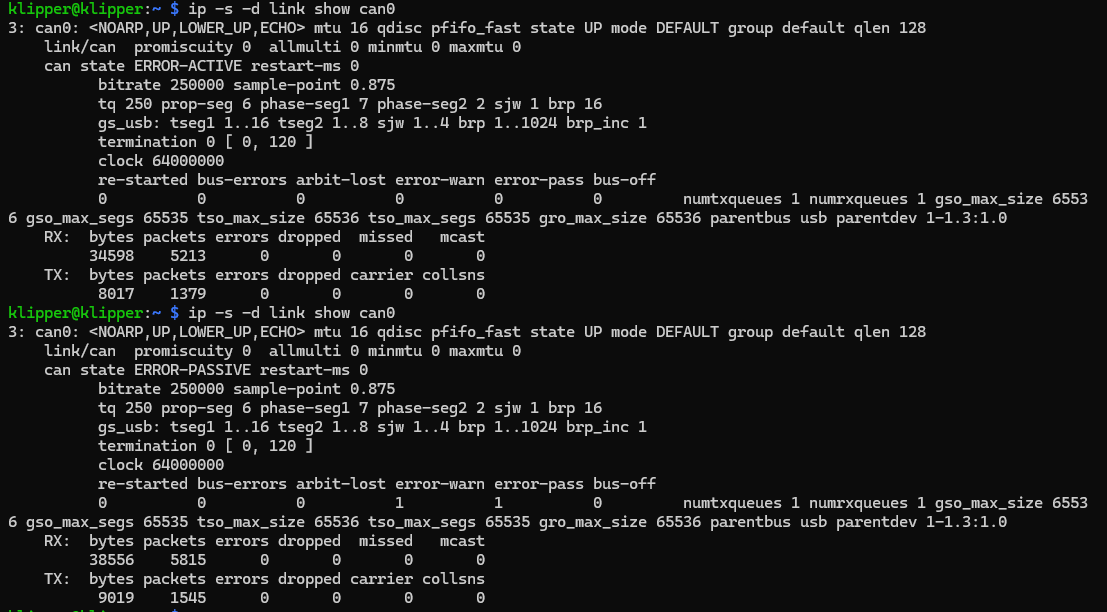
I also verify the bus failure by ip -s -d link show can0and typically get:
If I were to now reflash the EBB42 using kiauh, I would see klipper start correctly and ip -s -d link show can0would show can state ERROR-ACTIVE and the Tx/Rx packets incrementing if I keep issuing the command.
log before commenting out the motor and fan definitions:
I will try this. I will save the changed config but not restart klipper service. Then I’ll power down both the pi and the EBB42. Then reapply power to EBB42 first, then reapply power to the pi.
So this is why I have come to the conclusion (at this stage) that reflashing is my only workaround. Grateful for any more comments or suggested diagnostics.
FYI, I had similar issues setting up a EBB2209 recently; updating the firmware on the U2C solved a lot of connection issues. I’m still ironing stuff out, but at least now I can update the config without the whole thing crashing every time.
Oh, interesting - thank you. Would you happen to have a reference for the firmware (version) you put on the U2C? I know I read a post which said U2C update made their situation worse, which scared me off but I’m willing to try now that there’s no clear solution to the “must reflash” workaround so far.
You’ll probably have to substitute ip commands for the ifconfig commands. The flashing instructions worked however.
I’ve seen mixed information about whether it should be 1M or 500k speed; I’m running at 1M, but might change that to 500k if I keep having issues with connection reliability. At least after flashing the U2C I can print and update the configs
I’m marking this unsolved because as said, this is not normal for a .cfg file to change in an irrelevant way and break the interface with the toolboard.
Did my explanation and latest klippy.log make anyone else think this?