Odd StallGuard behavior - TMC5160 + ldo-42sth48-2004mah

Basic Information:

Printer Model: Voron 2.4 r2 revD
MCU / Printerboard: Leviathan v1.2
Host / SBC: Nitehawk-SB
klippy.log (964.7 KB)

Context:

I got into a bit of a rabbit hole, so feel free to not follow the white rabbit and skip ahead.

:rabbit: *It turns out that The Voron Team, The Kalico Crew, and the Klipper team, all have guides on how to configure sensorless homing. Back when I started I was running Klipper, so naturally I followed your guide. Klipper’s guide has you setting a run_current and sticking with that the entire time, while Voron’s guide has you downloading a macro which arbitrarily and temporarily changes that run_current to 49%… and I get it, it’s to make it easier to trigger the StallGuard. Not the point here. Anyways, Kalico’s guide hints at macros (step 6 - Create or update printer.cfg macros to home consistently), but they don’t focus on that at all because they have a new field for us to play around with and that’s the home_current field you see on my settings above. This field is akin to the Voron approach with the macro, except is now baked in. This was all very confusing, because I can’t grasp at a glance which approach is better and healthier for our machines. Maybe it’s worthwhile investigating, but that’s a side quest tbh. Doing this entire ordeal and not being able to discern which approach was better I decided to give the middle of the road approach a try (Kalico).*:rabbit:

That being said, I “successfully” enabled sensorless homing with all 3 guides. Well, really just follow one and whatever ever works with one guide will work with another. Oh! except for TMC-AutoTune, that requires different commands and different fields, and well I couldn’t get it to work so I deactivated it and haven’t really messed with it again.

Describe your issue:

(…) but why “successfully”?

Well, it turns out I don’t have a range of numbers to play around with, I have an exact set and if I deviate by a single digit from that set my toolhead will either stall or become unstoppable and crash against the flying gantry.

To be precise, if my settings are not exactly this:

driver_SGT: 1
home_current: 0.8
homing_speed: 20

It will not work. That means, my machine is deadlocked to slow homing speed for no apparent good reason. While other machines are homing at much higher speeds (nothing crazy - just comfortable).

What have I tried to attempt to solve this issue?

  1. Dismounted my flying gantry completely
  2. Fresh belts on all axis
  3. Checked every single bolt, those that are meant to be just “snug” tight are snug… and those that are meant to be “tight” are tight.
  4. De-racked my gantry
  5. Checked my belt path and ensure belts are not grinding against plastic, etc.
  6. With the belt tension meter tool ensured my BA belts were within spec (1.8 - 2.2) as well as the Z belts (2.5 - 2.8). Stock Gates GT2 belts.
  7. G28 > QUAD_GANTRY_LEVEL
  8. Formatted and re-installed everything.
  9. Made sure my MCU’s are running the latest firmware.
  10. De-activated TMC-AutoTune, Shake&Tune
  11. Used a tweaked version of the VoronTeam’s homing override macro to ensure my Z axis doesn’t hop/move. Now “G28 X” will do only that. This simplifies the process of tuning the SG.
  12. Tried the the “sensorless-stallguard-webui-graph-tool” that’s on this forum, but I feel it’s not useful for this part of the process. I think my senses provide enough feedback to check for the issues mentioned above. I’m sure I’ll be able to use it for other things, but I haven’t finished reading all the documentation on that topic.

I don’t know what else to do / check. If there is anything at all, please let me know.

Hi @kawabunga ,

It looks like your _HOME_X and _HOME_Y macros aren’t setting a different current. I would try adding this right before the G28 command in each of these macros:

SET_TMC_CURRENT STEPPER=stepper_x CURRENT=0.5

changing STEPPER and CURRENT accordingly. You can then duplicate this line after the home completes, setting the current back to the default.

Hi, sorry I should have been more explicit.

The VoronTeam has a macro (Voron24/macros/helpers/homing.cfg at PreKlippain ¡ EricZimmerman/Voron24 ¡ GitHub) which changes the run_current to a variable called HOME_CURRENT, but only uses 49% of said run_current.

    {% set RUN_CURRENT_X = printer.configfile.settings['tmc2209 stepper_x'].run_current|float %}
    {% set RUN_CURRENT_Y = printer.configfile.settings['tmc2209 stepper_y'].run_current|float %}
    {% set HOME_CURRENT = 0.49 %}
    SET_TMC_CURRENT STEPPER=stepper_x CURRENT={HOME_CURRENT}
    SET_TMC_CURRENT STEPPER=stepper_y CURRENT={HOME_CURRENT}

    (...)

    SET_TMC_CURRENT STEPPER=stepper_x CURRENT={RUN_CURRENT_X}
    SET_TMC_CURRENT STEPPER=stepper_y CURRENT={RUN_CURRENT_Y}

The Kalico Crew, handles it differently by including it as a value:

driver_SGT: 1
home_current: 0.8 <---- equivalent to Voron's Macro (what you are referring to)
homing_speed: 20 

That’s why my modified macro only cares about moving the axis. It simplifies the process of tuning the SG value, because I don’t have to worry about a Z hop.

## --------------------------------------------------------------------------------------
## StallGuard & Sensorless homing macros
## --------------------------------------------------------------------------------------

[force_move]
enable_force_move: True

[homing_override]
axes: xyz
gcode:
  {% set home_all = 'X' not in params and 'Y' not in params and 'Z' not in params %}

  SET_KINEMATIC_POSITION Z=1 SET_HOMED=Z      ; Imagine it's homed at 1mm above bed
  #G1 Z4 F1200                                 ; now raise it 4mm to be safe

  {% if home_all or 'X' in params %}          ; Checks if G28 is paired with X
    _HOME_X                                   ; if it is G28 X then execute
  {% endif %}                                 ; _HOME_X macro
  
  {% if home_all or 'Y' in params %}          ; Checks if G28 is paired with Y
    _HOME_Y                                   ; if it is G28 Y then execute
  {% endif %}                                 ; _HOME_Y macro
  
  {% if home_all or 'Z' in params %}          ; Checks if all axis are being homed or if the Z axis is requested
    _LIGHTS_ON                                ; Bring up the stadium lights for safety
    G90                                       ; Absolute positioning mode
    G1 X150 Y150 F15000                       ; Moves the print head to the center of a 300x300 bed
    G28 Z                                     ; Homes Z
    G1 Z10 F1500                              ; Parks the nozzle 10mm above bed
    QUAD_GANTRY_LEVEL                         ; QGL
    G1 X150 Y150 F15000                       ; Moves the print head to the center of a 300x300 bed
    G28 z                                     ; Back to center and boop one last time
    _LIGHTS_OFF                               ; Enough with the lights
  {% endif %}

[gcode_macro _HOME_X]
gcode:  
    _LIGHTS_ON
    SET_KINEMATIC_POSITION X=15 SET_HOMED=X   ; Imagine it's homed at 15mm from the gantry
    G91                                       ; relative (incremental) positioning mode.
    G28 X                                     ; home X
    G91                                       ; relative (incremental) positioning mode.

[gcode_macro _HOME_Y]
gcode:
    _LIGHTS_ON
    SET_KINEMATIC_POSITION Y=15 SET_HOMED=Y   ; Imagine it's homed at 15mm from the gantry
    G91                                       ; relative (incremental) positioning mode.
    G28 Y                                     ; home Z
    G91                                       ; relative (incremental) positioning mode.

In short, the current does change for homing then reverts back to the run_current value as expected… just not through the macro. It’s done internally through Kalico ™ magic that I haven’t really checked, but I do see they expose it as a field we can work on the .cfg file as illustrated above.

Sorry! This entire thing is more convoluted than it has to. Follow the white rabbit above :rabbit: for more details.

To use the home_current setting, you need to be running Kalico, not Klipper.

EDIT: I see you are running Kalico. I would ask on the Kalico Discord or Github for help, since it is substantially different than mainline Klipper.

1 Like

I think the key take away is that the same problem occurrs regardless of me using the latest Klipper or Kalico firmware.

It’s alright. I understand. I will re-flash everything and come back once I’ve done that.

1 Like

there is no Klipper, Kalico, Voron or something.
There is TMC.
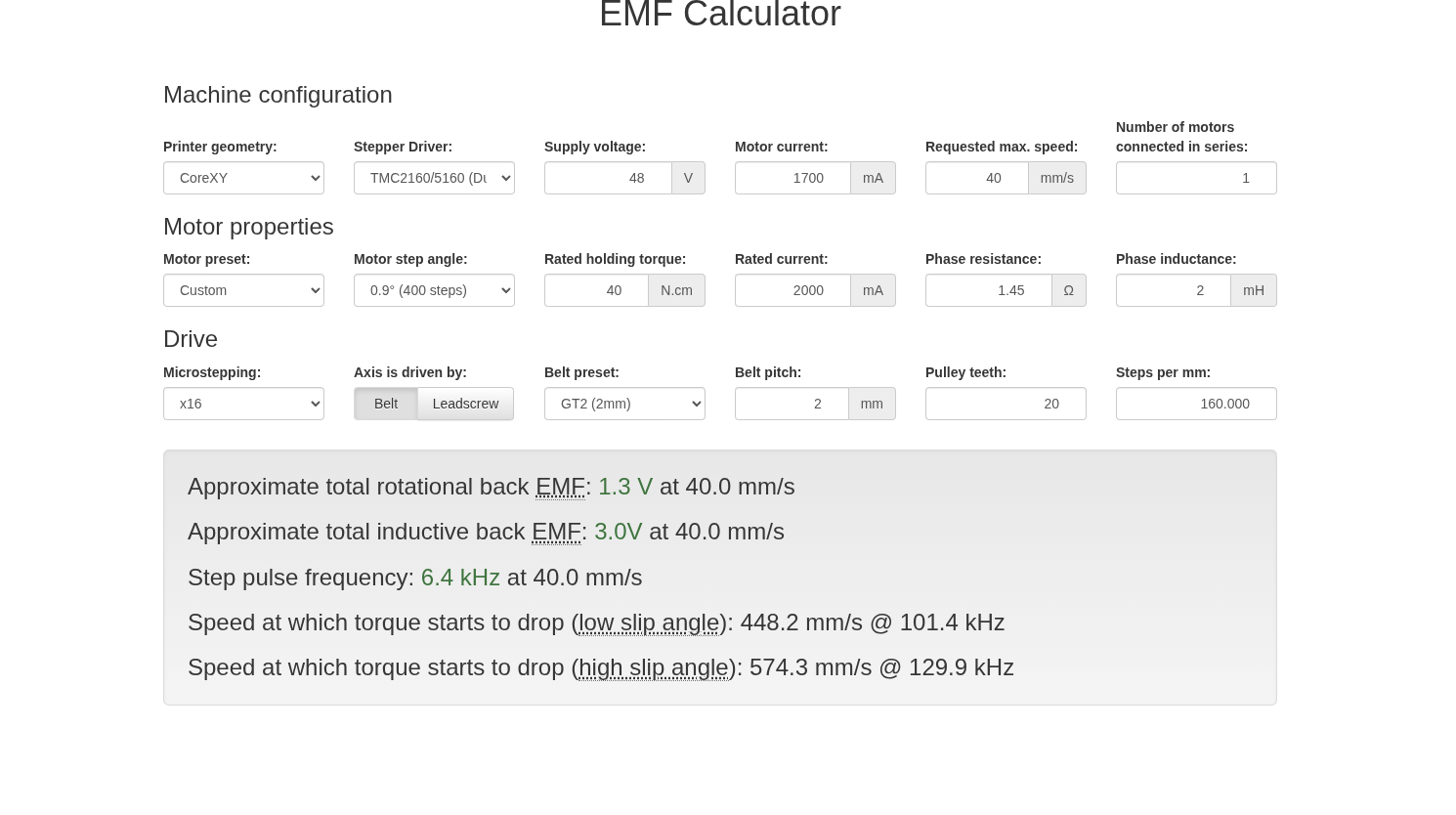
Stallguard measures back EMF.
Higher the speed → higher the back EMF.
Higher current → higher the back EMF.

Normally, you do just set your rated current, play with speed and acceleration and it should just work.

Normal SG2 values -10 < 0 < 10
https://www.analog.com/en/resources/app-notes/an-002.html

That is it.

You do have 0.9-degree motors, so probably you can work with 20 mm/s or higher.
For a normal 1.8 degrees, I would say 40-50 is more adequate.
Same for the current, you do have high current drivers, you do have high current motoros.
With a high chance, they have to run at 1.7A to work adequately.


(look at back EMF numbers).

Hope that helps.


IIRC, If, for some reason, it does trigger preliminary, at low speed, there is a coolstep thing, which allows to enable stallguard only above X speed.
For example, 10 mm/s.

This is another sort of duct tape, if it is really needed.

3 Likes

Thank you. It was probably needed to get the conversation going.

Yes. Exactly.

Exactly… and this the point of the post. That’s what should happen, but it doesn’t happen and I’m trying to determine why or at the very least not determine why and get a comfortable/safe, but faster homing speed like every one else.

With your suggestion, I re-ran some test:

driver_SGT: ∆             ; (-64 — 63)
home_current: 1.7         ; (0.8 — 2)
run_current: 1.7          ; (0.8 — 2)
homing_speed: 40          ; (20-100)

Notice, the only thing changing here is the SGT value.

Test 1.

  • -64, -50, -40, -30, -20, and -10 = stalls.
  • At sgt 0 the toolhead became unstoppable so I had to emergency halt.

Test 2.

  • -5, -4, -3, and -2 = stalls.
  • At sgt -1 the toolhead became unstoppable so I had to emergency halt.

Test 3.

  • 10, 20, 30, 40, 50, and 60 = the toolhead became unstoppable so I had to emergency halt.

For reference: klippy.log (1.5 MB)

@kawabunga
Hello kawabunga,
I hope you got a real good house insurance :wink: Can you and your family easily escape, when the house burns down? I wouldn’t touch Kalico! Literally all rational safety measures from Klipper are deactivated. I suggest to use at least something like this Heater Bed Temperature is increasing without heating - #20 by hcet14, when using Kalico. Call me “Safety N*zi” or chicken-hearted, but I would never risk my life (and/or the life of others!) for my hobby. The Internet is full of burning FDM printers!
One of the main reasons for me to switch from Marlin to Klipper are the safety measures!

Thanks, and no worries. It’s a good thing.

I was not supposed to reply until I had everything back on Klipper, as I promised, but I am almost done re-doing the Ellis Tuning Guide. You know, I am checking yet another factor that might help me find the answer to this post.

The only reason I installed Kalico is that I did not have the time to read through their entire code base to see what they did that was so different from the Voron Team’s approach to sensorless homing with macros. I do see they made it convenient by exposing the variable “home_current,” and I am sure they did other things under the hood to simulate the Voron macro. Other than that, I do not know. Again, the point of the switch was just to be thorough and try to stumble upon the answer to this post.


TL;DR = As soon as I’m finish with the Ellis tuning guide I’m going back to Klipper.

1 Like

Assuming nothing weird happened underneath (in the code) (well, homing sometimes stops your toolhead).

You can try to decrease the acceleration. I guess it just triggers StallGuard too early (right at the acceleration ramp).