Printer Model: Prusa i3MK3S+ with E3D High Flow 0.4mm nozzle and heater core
MCU / Printerboard: Einsy
Host / SBC RPi5
klippy.log
Fill out above information andin all cases attach yourklippy.logfile (use zip to compress it, if too big). Pasting yourprinter.cfgis not needed Be sure to check our “Knowledge Base” Category first. Most relevant items, e.g. error messages, are covered there
Describe your issue:
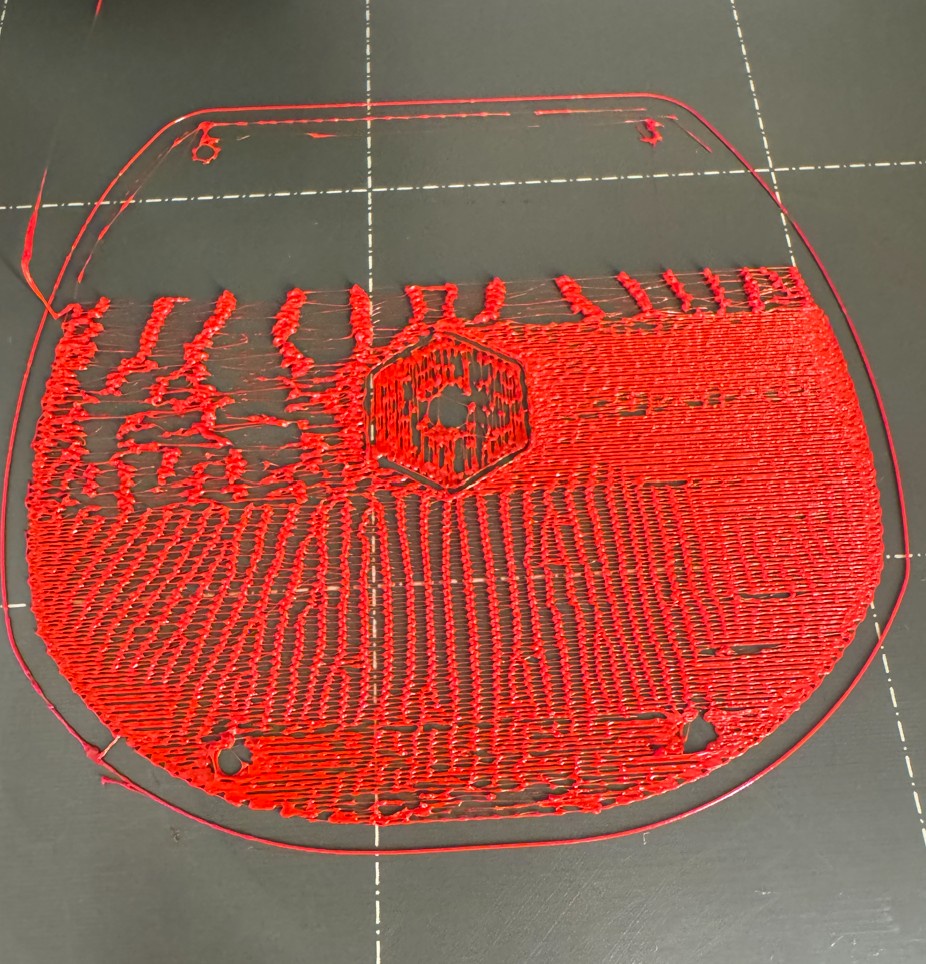
Hello, there had been stability issue with my phone connecting to Klipper. So, I went to Update Manager in mansail from the browser and updated the firmware. Not sure if this is related but since last night, it cannot even print the first layer properly. Done first layer calibration many times and washed the PEI sheet each time I printed. Changed the nozzle and filament but same net-like first layer. Anybody knows what is wrong and how to fix it?
If you lift your printer’s Z, preheat, and attempt to extrude, does the filament come out consistently? Are there any clicking noises coming from the extruder?
If the nozzle is clogged it is mostly not caused by the nozzle.
Most times there is a gap between the nozzle and the heatbreak where the molten filament escapes, cooles down and solidifies and sooner or later blocks the whole way through the hotend.
Besides the main topic it looks like you are either a bit too far away from the bed or the first layer flow is to small or maybe even both.
How much filament did you extrude on the request of @3dcoded?
Looks like the first few cm might be fine and the more it extrudes the less comes out.
I pressed “Load filament” once and sometimes twice and it extruded consistenly.
Now, there is a bigger issue. I tried to print another thing that used to work but it also failed. Instead of filling in the first layer, it printed in strips. I noticed one bad thing. Even I loaded the filament before starting the print job, during the 1st priming stage (when the nozzle moved from right to left), almost no filament was extruded. When it moved from left to the x-axis position where the print object starts, it extruded filament. I tried again. Pressed Load Filament to load it. It extruded consistently. Then during the first step of the priming, no filment was extruded. I could easily pull the filment out from the hotend. The printer did not even try to grap the filament when I tried to pull it out during printing. When I tried again and no filament was extruded after priming, I pushed the filament down by force and it was extruded. So what is wrong?
If you can pull the filament out without any resistand the extruder does not seem to grab it, if I understand you correctly.
So the gears might be loose or the pressure is too low or maybe a loose connection to the extruder motor might be present.
Are you printing PETG? The temps in your log lets assume that.
Your config looks a bit messy but should be ok.
There are two cases: Today I could pull the entire filament out without any resistance. Last weekend, I could pull it out easily until almost at the end. The filament tip did not come out. I had to press the Unload Filament button on the GUI to be able to pull out the entire filament.
Could it be that some melted filament got somehow into the mechanistics of your extruder? Sometimes, when the filament dirt in your extruder is soft enough when heated it works. Sometimes it blocks your extruder mechanical?
First, I would do a search here and in the www, if someone had a similar problem with your extruder type.
What I said above was more a question to all here or best guess from my side! I don’t know your extruder!
Disassemble the extruder, clean the parts and put it together again. I guess you could find videos in the www how to do that.
Assuming you kept the stock MK3 extruder, in my experience, that’s pretty prone to grinding the filament instead of the extruder skipping. If you unload the filament, do you see a shape like this in the filament? (picture frrom Simplify3D)
I use the E3D Revo extruder. There is no grinding on the filament. You know we can use M18 to disable all motors. I could be wrong but I am under the impression that during some print sessions, the extruder motor might have been disabled or not enough force was generated for it to keep the filament at the level it was supposed to be. For example, sometimes during those problematic print jobs, I could easily manually pulled filament out or easily pushed them in for the nozzle to extrude more. Could there be something wrong in the software? I recall that after I modifed the M600 position according to the following post, in the Update Manager I got a message about a file being not clean. I think I did a light fix option. Enclosed is the latest log.
When you push in or pull out the filament, is there a “chugging” sound or feeling when you do that? If there is, then you don’t have enough current going through the extruder stepper.
If there isn’t and you don’t see any damage to the filament like @3dcoded pointed out then the teeth of your extruder gears are not making good contact with the filament and isn’t generating enough force to push the molten plastic out through the nozzle.
When I pushed in or pulled out the filament, there was not “chugging” sound or feeling. It was a smooth motion. How to make the teeth of the extruder gears to make good contact with the filament to generate enouch force to push the molten plastic out through the nozzle? Keep adjusting the idler screw? It is very strange.
Thanks for the clarification. I just dropped in the Revo to the original i3MK3S+. So it means I am using the stock extruder. I am not sure what you mean by having the extruder tightened.
Speaking of extruder.. I originally moved to Klipper for input shaping and faster printing. Also, Prusa does not seem to update the firmware for the i3MK3S+ as often as their latest machines. Actually, is it a good idea to change the extruder to Hemera, Roto or whatever?